For a free, official start, install IELTS by IDP, then add one app for your weakest skill. Each IELTS preparation app below delivers practice tests, lessons or AI feedback for the four tested skills on a phone or browser.
Apps are grouped by publisher, not ranked: IDP and Cambridge University Press & Assessment first, independents next. Each faces the same criteria, from free tier to platforms, checked on Google Play or the App Store on 7 October 2026. The British Council’s two apps had gone by then. A skills table, pricing, devices, choosing, limits, mistakes and home study follow. OneIELTS publishes this page, so its platform comes last.
Eight apps made the cut.
- IELTS by IDP: booking and official prep.
- Write & Improve: free writing checks.
- Magoosh: video lessons.
- IELTS Practice Band 9: AI scoring.
- LeapScholar: mock tests and live classes.
- E2 IELTS: tutor marking.
- ELSA Speak: pronunciation drills.
- OneIELTS: browser mock tests.
1. IELTS by IDP
IDP’s official app puts test booking, IELTS results and preparation in one free download. Because IDP co-owns the test, the app connects to your own booking record. Its Google Play listing adds an AI chatbot, video lessons inside a partner course and AI-enabled practice tests from Cambridge for India.
Six checks show what the IDP app gives you.
- Publisher: IDP (IELTS co-owner). IDP Education Ltd publishes it and runs IELTS test centers in more than 150 countries.
- Test booking and results. Book a test in a few taps, then check and share your IELTS results there.
- AI-enabled practice tests. The Cambridge course adds free sample Listening and Reading tests with auto-marked feedback, India only.
- AI chatbot. The latest update adds an AI chatbot, billed as your IELTS sidekick, for test questions and guidance.
- Video lessons. The in-app E2 IELTS course offers video lessons, live classes and a score estimator, plus paid upgrades.
- Free tier and platforms. Free download on Google Play for Android and the App Store for iPhone.
2. Write & Improve by Cambridge
Cambridge built Write & Improve as a free writing checker, the only co-owner tool here that gives writing feedback at no cost. You type an answer, submit it and get automated feedback with a CEFR-linked result. It’s a general English tool, so it supplements IELTS Writing practice.
Here is where Write & Improve helps and where it stops.
- Publisher: Cambridge. Cambridge University Press & Assessment, one of three IELTS co-owners, builds and runs the tool.
- Automated writing feedback. It flags where your writing needs work and returns a CEFR level, not an IELTS band.
- Task types it fits. The paid Test Zone IELTS adds IELTS prompts for drafting Writing Task 1 and Writing Task 2.
- What it does not cover. It has no Listening, Reading or Speaking practice, so pair it with a four-skill app.
- Free tier. Free tasks need no registration, while Write & Improve +Test Zone IELTS is a paid subscription.
- Platforms. It runs in a web browser; neither Google Play nor the App Store listed a version.
Its CEFR result doesn’t map onto the IELTS Task Response criterion, so check prompt coverage yourself.
3. Magoosh IELTS Prep App
Magoosh turns its IELTS course into structured lessons on video: over 90 on Android and over 125 on iPhone. The catch is age. Google Play shows a last update on 3 October 2023, and the App Store version dates from August 2019, so recent format changes may be missing.
Magoosh gets the same six checks as the official apps.
- Publisher: Magoosh (independent). Magoosh is an online test-prep company with no link to the IELTS co-owners.
- Video lessons. Expert IELTS tutors wrote lessons covering Listening, Reading, Writing, Speaking and grammar, plus study schedules for planning.
- Progress tracking. The app tracks progress in real time and shows your strengths and weak areas.
- Vocabulary resources. Vocabulary sits in a separate Magoosh IELTS flashcards app, free to download on the App Store.
- Free tier and paid plans. Both stores list it free, and Google Play shows no ads or in-app purchases.
- Platforms. Android, iPhone, iPad and Apple-silicon Macs, according to the Google Play and App Store listings checked here.
4. IELTS Practice Band 9
IELTS Practice Band 9 is a third-party app from LT EduApp with AI evaluation for Writing and Speaking. Its own disclaimer says it isn’t affiliated with any IELTS co-owner. It suits Speaking drills best, with 1,000+ Part 2 cue cards and band estimates on recorded answers.
This third-party app is checked against the same six points.
- Publisher: independent developer. LT EduApp publishes it; the Apple listing names developer Linh Nguyen as seller.
- AI evaluation for Writing and Speaking. AI scores Task 1, Task 2 and full Speaking tests with criterion-based band estimates.
- Cue cards. The Speaking bank lists 100+ Part 1 topics, 1,000+ Part 2 cue cards and Part 3 questions.
- Sample essays. Writing Task 2 sample essays, Academic and General Task 1 samples and essay templates are included.
- Free tier and ads. Free to install; the Android version contains ads and both stores list paid plans.
- Platforms. Android, iPhone, iPad and Apple-silicon Macs, with app data backup and restore across your devices.
5. IELTS Prep by LeapScholar
LeapScholar, a study-abroad company, aims its app at Indian test takers who want mock tests and live classes in one place. The iPhone app is IELTS Prep by LeapScholar, while Android lists it as IELTS & PTE Prep by Leap. Many searchers want a PC download, but neither listing offers a Windows version.
LeapScholar’s offer breaks down like this.
- Publisher: LeapScholar (independent). Outleap Technologies Private Limited publishes both store versions under the LeapScholar and Leap names.
- Lesson format. Structured lessons cover IELTS Academic and General Training, plus PTE Academic in the same app.
- Mock tests. The listing promises 50+ IELTS and PTE mock tests with instant scores and improvement areas.
- Writing and Speaking feedback. It lists AI-powered speaking practice, writing evaluation and trainer feedback in live classes.
- Free tier and paid plans. Free to install; both stores list in-app purchases such as self-prep courses.
- Platforms including PC. Android, iPhone and Apple-silicon Macs; no Windows PC version appears on either store.
6. E2 IELTS: A Coach-Based App
E2 IELTS from E2Language is a coach-based course where human teachers mark your Writing and Speaking. That’s the main difference from AI-only apps. E2 promises detailed tutor feedback within 48 hours, runs recorded live lessons, and works in a browser or as a course inside IELTS by IDP.
The coach-led model is assessed point by point here.
- Publisher: E2Language (independent). E2Language is a test-prep company that lists an IDP IELTS partnership on its site.
- Coach-led lessons. Live classes with expert teachers run in several time zones and are recorded to watch later.
- Tutor feedback on Writing and Speaking. Expert teachers mark your submitted answers and return detailed feedback within 48 hours.
- Mock tests. Full and mini mock tests, designed by ex-examiners, cover IELTS Academic and General Training.
- Free tier and paid plans. E2 gives 14 days free on any course with no credit card, then paid packages.
- Platforms. It runs in a web browser; no standalone E2 app appeared on Google Play or the App Store.
7. ELSA Speak: An IELTS Speaking Practice App
ELSA Speak is a general English pronunciation app that uses speech recognition to correct sounds and word stress. It isn’t built for IELTS only. It drills pronunciation rather than full test parts, so pair it with Part 1 to 3 practice for IELTS Speaking.
Where ELSA lifts a Speaking score, and where it stops, shows in six points.
- Publisher: ELSA (independent). ELSA, Corp. publishes the app, which has no link to the IELTS co-owners.
- Pronunciation drills. Short drills target tricky sounds, word stress and accent, with real-time correction as you speak.
- Speech feedback. An AI coach gives real-time feedback on each attempt and tracks progress, with role-plays that build fluency.
- What it does not cover. No Listening, Reading or Writing, and no timed Speaking test with Part 2 cue cards.
- Free tier and paid plans. Free to start; exam preparation needs ELSA Premium, which offers a 7-day free trial.
- Platforms. Android, iPhone and iPad, per the Google Play and App Store listings checked here.
8. OneIELTS Web App
OneIELTS publishes this article, and its platform is a browser-based IELTS practice site with mock tests and an AI coach. It runs in any mobile browser. Store apps also exist: IELTS Practice & Prep OneIELTS on Google Play and IELTS – Mock Test & AI Tutor on the App Store.
OneIELTS is held to the same six points as the seven apps above.
- Publisher: OneIELTS (this site). OneIELTS, a test-prep brand of Acadion, publishes this page and the platform reviewed here.
- Full-length mock tests. The site lists 100+ computer-based IELTS mock tests in real exam format and timing.
- Per-skill practice. Section tests let you practice Listening, Reading, Writing or Speaking alone, with an individual result.
- AI coach feedback on Writing and Speaking. The AI coach gives AI-scored feedback and a band score estimate.
- Free tier and paid plans. The free mock test needs no sign-up; premium subscriptions add full access and expert feedback.
- Platforms. Web browser on phone or PC, plus Android, iPhone, iPad and Apple-silicon Mac apps.
Which Apps Are Best to Prepare for Each IELTS Skill?
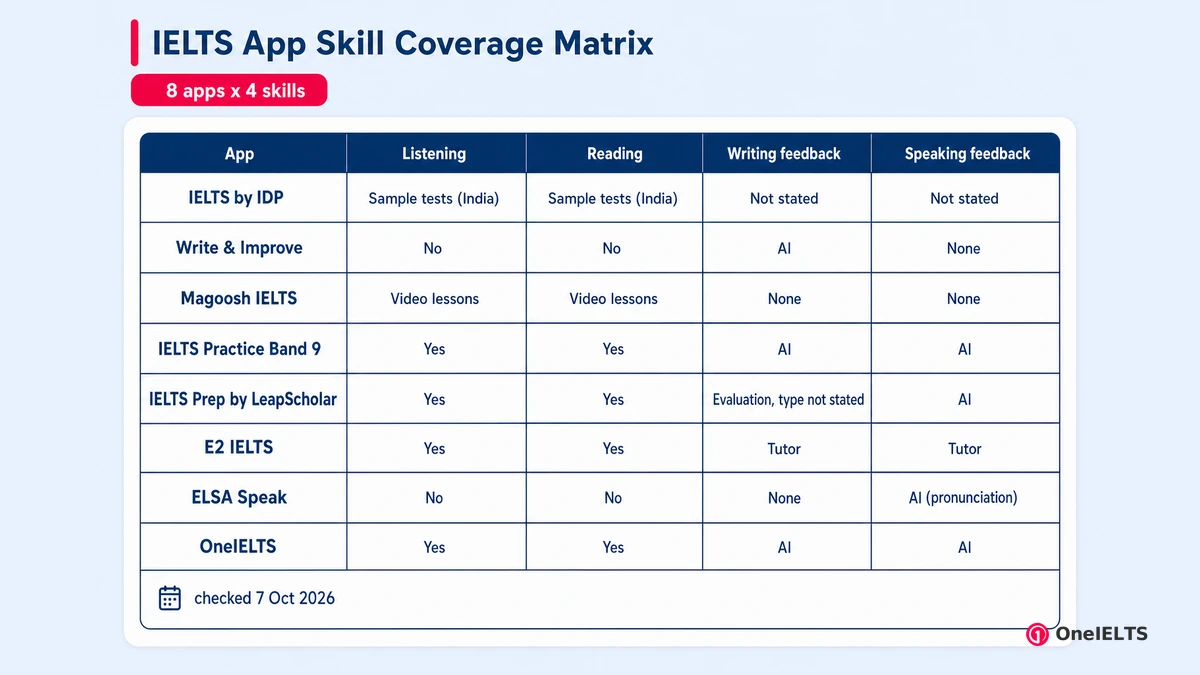
No single app covers every skill equally well. For Listening and Reading, the store pages show the deepest practice in IELTS Practice Band 9, LeapScholar and OneIELTS. For Writing, Write & Improve gives free AI feedback and E2 IELTS gives tutor feedback. For Speaking, Band 9 scores full tests, while ELSA Speak handles pronunciation and Magoosh’s flashcards build vocabulary.
Match your weakest skill to the row built for it.
| App | Publisher type | Listening | Reading | Writing feedback | Speaking feedback | Free tier | Platforms | Date checked |
|---|---|---|---|---|---|---|---|---|
| IELTS by IDP | IELTS co-owner | Sample tests (India) | Sample tests (India) | Not stated | Not stated | Yes | Android, iPhone | 7 Oct 2026 |
| Write & Improve | IELTS co-owner | No | No | AI | None | Yes | Web browser | 7 Oct 2026 |
| Magoosh IELTS | Independent | Video lessons | Video lessons | None | None | Yes | Android, iPhone, iPad, Mac | 7 Oct 2026 |
| IELTS Practice Band 9 | Independent | Yes | Yes | AI | AI | Yes (ads) | Android, iPhone, iPad, Mac | 7 Oct 2026 |
| IELTS Prep by LeapScholar | Independent | Yes | Yes | Evaluation, type not stated | AI | Yes | Android, iPhone, Mac | 7 Oct 2026 |
| E2 IELTS | Independent | Yes | Yes | Tutor | Tutor | 14-day trial | Web browser | 7 Oct 2026 |
| ELSA Speak | Independent | No | No | None | AI (pronunciation) | Yes | Android, iPhone, iPad | 7 Oct 2026 |
| OneIELTS | Independent (this site) | Yes | Yes | AI | AI | Yes | Web, Android, iPhone, iPad, Mac | 7 Oct 2026 |
Only two apps come from an IELTS co-owner, and neither gives Speaking feedback. AI feedback is now common, but tutor feedback appears only at E2 and in LeapScholar’s live classes. “Not stated” means the store page was silent, not that the feature is missing.
To fill a gap, OneIELTS offers IELTS speaking practice and IELTS writing practice. The IELTS listening practice and IELTS reading practice sets cover the other two skills.
Which IELTS Preparation Apps Are Free?
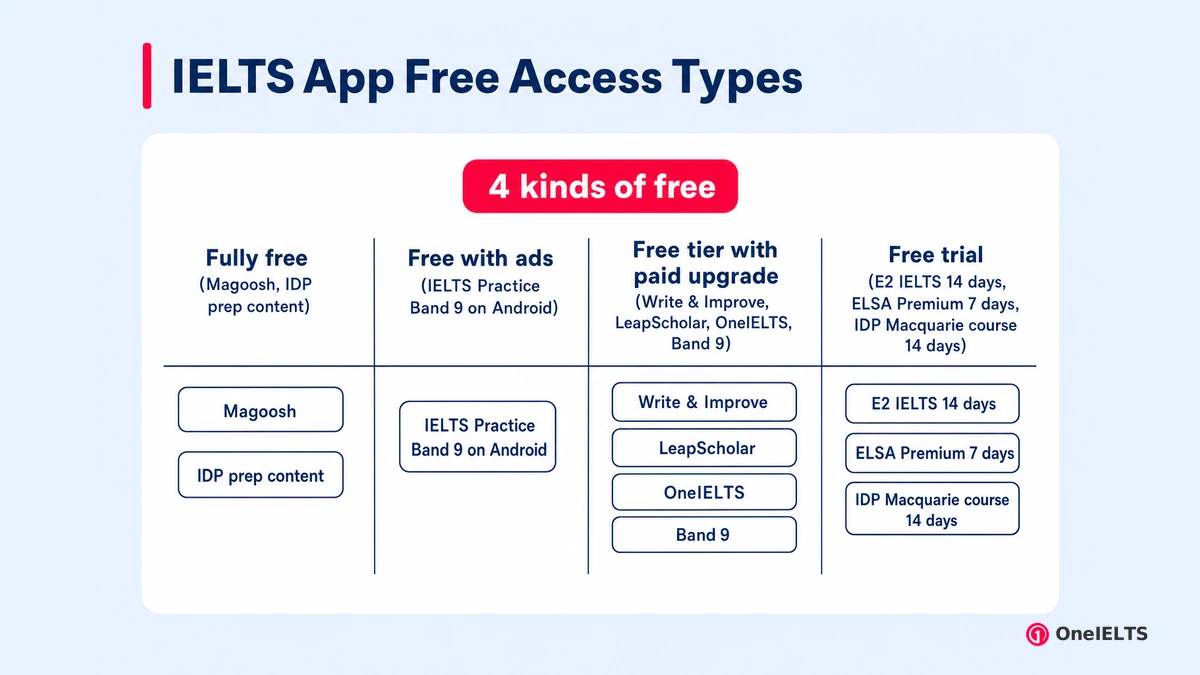
All eight apps open without payment, but only Magoosh and IDP’s own prep content stay free throughout. The other six apps charge through a freemium model: a free tier first, then in-app purchases, a subscription or a time-limited trial. IDP’s official content and the British Council’s free website practice offer the safest start.
Four kinds of “free” show up across these apps.
- Fully free. Magoosh shows no ads or in-app purchases on Google Play, and IDP’s articles, videos, quizzes and booking tools cost nothing.
- Free with ads. IELTS Practice Band 9 is the only app here whose Android listing says it contains ads, alongside optional paid plans.
- Free tier with paid upgrade. Write & Improve, LeapScholar, OneIELTS and Band 9 give free practice first, then sell subscriptions or courses through in-app purchases.
- Free trial. E2 IELTS gives 14 days free on any course, ELSA Premium starts with a 7-day free trial, and IDP’s Macquarie course runs 14 days.
Which IELTS Preparation Apps Work on Android and PC?
Six of the eight apps run on Android, six on iPhone, and three in a web browser on any PC. Write & Improve, E2 IELTS and OneIELTS need no download on a desktop PC. That matters for computer-delivered IELTS, where you type both Writing tasks, so typed practice on a keyboard beats tapping essays on a phone. Four iOS apps, Magoosh, Band 9, LeapScholar and OneIELTS, also run on Apple-silicon Macs.
Device support splits the eight apps into three groups.
- Android. IELTS by IDP, Magoosh, Band 9, Leap, ELSA Speak and OneIELTS all list Android versions on Google Play.
- iPhone and iPad. All six run on iOS; IDP and LeapScholar list iPhone only, the other four add iPad.
- PC and Mac (browser or desktop). Write & Improve, E2 IELTS and OneIELTS run in any desktop browser, no download needed.
The computer-delivered IELTS guide covers the on-screen format you’re practicing for.
How Do You Choose the Best IELTS Preparation App?
Choose by your test type, your weakest skill, the feedback you need on Writing and Speaking, and your budget. IELTS Academic and IELTS General Training differ in Reading and Writing Task 1, so the app must carry your version. The IELTS Academic vs General Training comparison shows where they split.
Five questions narrow the list to one or two apps.
- Test type: Academic or General Training. Check the listing names your module; Band 9, LeapScholar and E2 cover both IELTS Academic and IELTS General Training.
- Weakest skill. Take one mock test first, then pick the app built for your lowest skill rather than the one with most features.
- Feedback type on Writing and Speaking. AI feedback is instant and cheap, while tutor feedback from E2 or live classes catches errors AI scoring misses.
- Official or independent content. Official practice material from IDP and Cambridge matches the real test most closely, so use it before independent question banks.
- Budget and free tier. Start free, and pay only once your band score target and test date show what extra feedback you need.
Can You Prepare for IELTS Using Only an App?
No, most test takers need full timed practice tests and feedback on Writing and Speaking alongside an app. Apps suit mobile learning: ten-minute vocabulary sets, a Listening section on the bus, a Part 2 cue card before work.
They’re weak at a full-length practice test under timed conditions, a 250-word essay typed on a phone screen, and a real Speaking interview with follow-up questions. Self-study works best when an app handles daily drills and a computer handles the long tasks.
Pair the app with official practice tests and a printed or digital guide, and build the rest from an IELTS preparation plan.
What Common Mistakes Do People Make Using IELTS Preparation Apps?
Apps fail when passive watching replaces active practice. Passive learning feels productive, yet bands move only when you produce answers and get them corrected.
Five habits cancel out most of an app’s value.
- Using too many apps at once. Installing five apps splits your time across overlapping content; keep one main app and one skill-specific tool.
- Watching lessons instead of practicing. Video lessons explain strategy but don’t build speed; finish each lesson with ten minutes of timed questions.
- Skipping Speaking practice. Typing answers is easier than talking, so Speaking practice gets dropped; record one cue card answer every day instead.
- Memorizing model answers. Examiners penalize memorized answers that don’t fit the question; study model answers for structure, then write your own.
- Never taking a full timed test. Short app quizzes hide stamina problems, so sit one timed test of all four skills before booking.
How Can You Prepare for IELTS at Home?
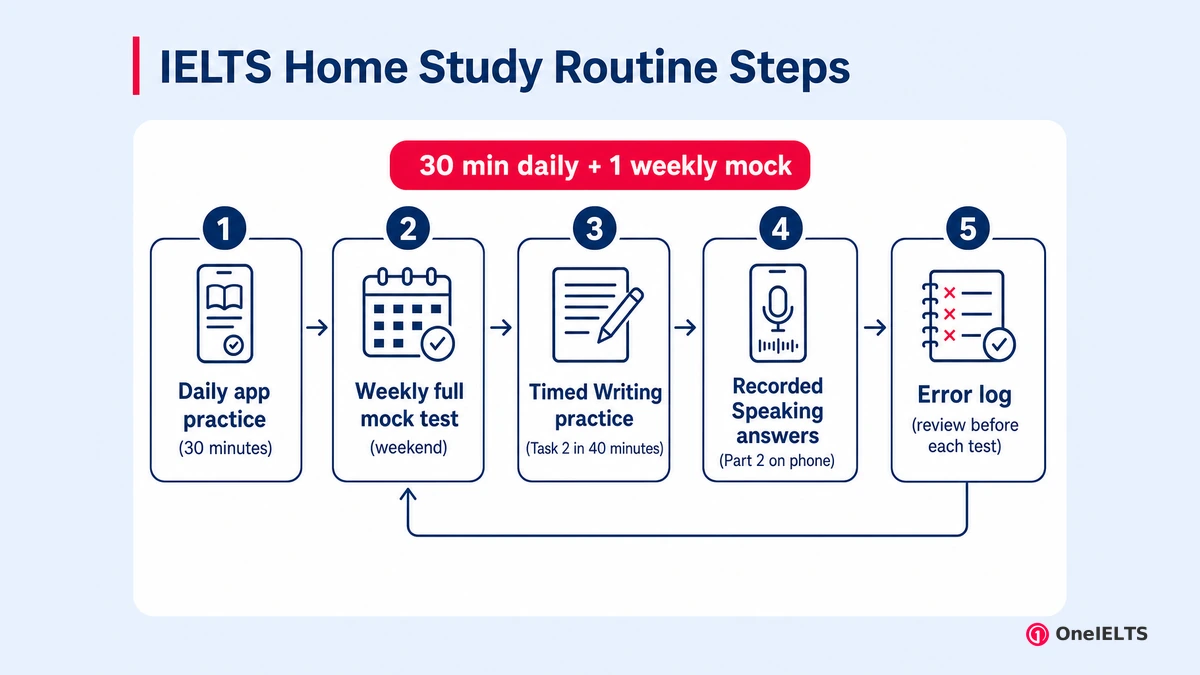
At home, combine one or two apps with a weekly full mock test, timed Writing practice, and recorded Speaking answers. Self-study at home only works with a fixed study routine, because nobody else sets the pace.
A home routine has five parts, and apps cover only some of them.
- Daily app practice. Spend about 30 minutes a day in one or two apps on vocabulary and your weakest skill’s question types.
- Weekly full mock test. Sit one full mock test each weekend under exam timing to track your band and test stamina.
- Timed Writing practice. Write one Task 2 essay in 40 minutes on a keyboard or paper, then get it checked.
- Recorded Speaking answers. Record Part 2 answers on your phone and replay them; recorded answers expose pauses and repeated words quickly.
- Error log. Keep an error log of every wrong answer and its cause, then review it before each weekend test.
What Is a Good Daily Study Plan Using IELTS Apps?
A good daily plan gives about 30 minutes to apps on your weakest skill and keeps full tests for the weekend. Split the 30 minutes into 10 for vocabulary, 15 for one skill drill and 5 for reviewing mistakes. Save the weekly mock test for Saturday or Sunday. A week-by-week IELTS study plan sets these blocks out by target band.
Can You Score 7 in IELTS in One Month?
Yes, a band 7 in one month is realistic only if your current level is close to it, usually around band 6 to 6.5. Take a mock test on day one, because your starting level decides the gap. Apps help with daily practice, but they won’t close a full band alone in four weeks. The IELTS band 7 guide covers the tips that lift scores fastest.
How Do You Get 8.5 in IELTS?
An overall band 8.5 needs a four-skill average of at least 8.25, which usually means band 8 or higher in most skills, with near-error-free Listening and Reading. IELTS rounds a .25 average up to the next half band. At band 8.5, apps add little. Writing feedback and Speaking feedback from a tutor or examiner-style marker matter more. The IELTS band 8 guide covers the step below.
Where Can You Practice IELTS Online for Free?
The free practice from IDP and the British Council, and free mock tests such as the one on OneIELTS, let you practice online without paying. Start with one free mock test, since its band score estimate shows where app practice should go. OneIELTS runs the linked free IELTS mock test, which covers all four skills and needs no sign-up. Online practice from IDP and the British Council is free too.
Written by Fahimur Rahman, reviewed 7 October 2026.
Last verified: 7 October 2026
Practice for the Real IELTS Exam
Apply what you’ve learned with free, exam-style practice:
- Take a free IELTS mock test — all four skills, real exam timing, AI band scoring
- Start with the free mock test — one full test, no payment needed
- Practice skill by skill — Listening, Reading, Writing and Speaking sets